Can VVDI BIMTool Pro Repair BMW FRM?

 Question:

Can Xhorse VVDI BIMTool Pro Read /write BMW FRM (Footwell module) EEPROM and repair flash?


Answer:

No.  VVDI BIM Tool won’t repair FRM module. It is for BMW key programming and coding.

Go for vvdi prog or key tool plus instead.

Check: How to Repair BMW FRM E Series XEQ384 via VVDI Prog?

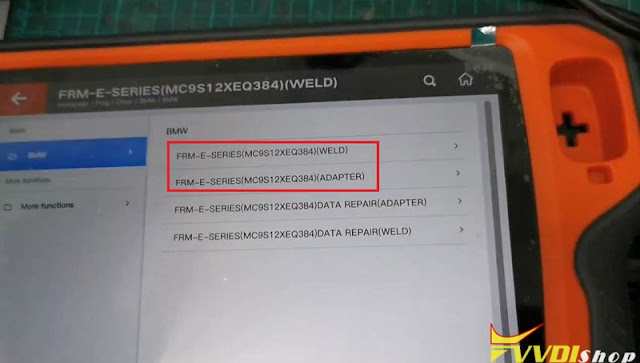
vvdi prog BMW FRM E Series XEQ384

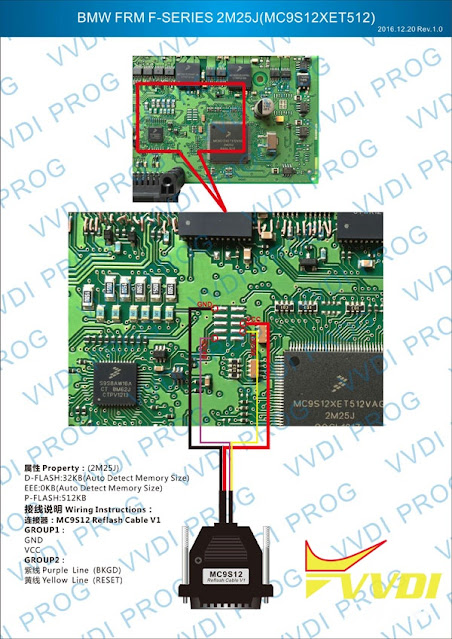
VVDI Prog BMW FRM E Series XET512

VVDI Key Tool Plus has the function of vvdi prog inside? Can read and write frm module, etc?

Yes, key tool plus will read and write parts of FRM modules of E chassis.  FRM clip adapter is required.
vvdi-key-tool-plus-frm-1

Xhorse VVDI Key Tool Plus Repair BMW MINI FRM XEQ384 Data

Comments

Popular posts from this blog

Xhorse VVDI BIMTool Pro Update to V1.8.8

  Xhorse VVDI BIMTool Pro   software update to V1.8.8 on June 15th, 2023.   2023-06-15 Require firmware V1.8.4 ===== BMW V1.8.8 ===== 1. Improvement the internet connection 2. Bugfix Free download VVDI BIMTool software V1.8.8 http://dl.xhorse.com/product/bmwtool/software/BMWTOOL-InstallerV188.exe

VVDI BIM Tool Pro E F G Series Coding Guide

  This article aims to intro the VVDI BIMTOOL Pro tool’s new function: BMW E/F/G programming and coding BMW E/F/G programming and coding is the most important new feature of  Xhorse VVDI BIM Tool Pro Tool .The ethernet interface will speed up the writing data instead of the USB cable previously used to connect to the BMW Tool. Part 1. Program / Code BMW Exx Connect Car   Can auto detect vehicle model, read module information, support chassis: E36, E38, E39, E46, E52, E53, E60, E63, E64, E65, E66, E67, E70, E71, E72, E83, E85, E86, E89, E90, E91, E92, E93, K1X, K24, KH2, R50, R52, R53, R55, R56, R57, RR1,.etc chassis   Read and write Vehicle configuration(FA/FP) Can read the configuration information inside of vehicle module, and to change the vehicle configuration information for replacing second-hand module.   Registered unit information from gateway / Calculate adaptive control unit Read registered unit information from gateway Calculate adaptive control unit-...

VVDI BIMTool Pro BMW FEM BDC KM Reset Guide

  Tutorial:   BMW Series F series Reset FEM BDC mileage eeprom 95128-95256 using   Xhorse VVDI BIMTool Pro . i.e. F20 FEM module Procedure: Remove BMW FEM module from the vehicle Set up bench connection. Connect VVDI BIMTool pro with  godiag BMW FEM test platform , FEM module, feed vvdi with 12v+ power supply (very important) Turn on ignition switch of the godiag test platform Run  Xhorse vvdi bim tool software , go to BMW/FEN Key Learn and Get key Information As you can see 2 keys are programmed and you can see VIN and current mileage is  183374 KM Press  Reset KM BIMTool will ask to program FEM/BDC first Press Program BMW FEM/BDC System Follow 4 steps to program BMW FEM/BDC Step 1. Backup coding Read FEM/BDC coding ia OBDII or on bench Step 2. Prepare service EEPROM Open FEM/BDC shell, find 95128/95256 chip position, read EEPROM dump via BDM programmer Load original eeprom dump and save special EEPROM dump, write special EEPROM dump back to...