
Xhorse VVDI BIMTool Cannot Update CAS3+ ISTAP Firmware via OBD Solution

 Problem:

It is a BMW CAS3+ ISTAP. I was trying to get the ISN from the DME but I got a fail to connect message (Current CAS can’t update firmware via OBD).
however, the Xhorse VVDI BIMTool Pro can successfully read the DME information.
I have another question, for DME/CAS what would be the ideal specs of a power supply?
Volts/Amps. for bench test and coding.

Xhorse VVDI BIMTool Cannot Update CAS3+ ISTAP Firmware via OBD  1

Xhorse VVDI BIMTool Cannot Update CAS3+ ISTAP Firmware via OBD  2

Solution:

You will need 12V 3A power supply.


If CAS3 is ISTAP version, there will prompt update CAS flash when the first time read key info (see image below). Upgrade CAS flash only need 10 minutes, after update flash turn to next step.

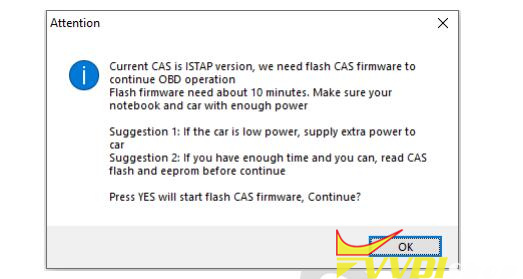
Xhorse VVDI BIMTool repair CAS3+ ISTAP 1

If the update CAS failed for some reasons, you can fix it with the function in Menu->Special Function->CAS Repair (EEPROM OBDII), choose type“OBDII-CAS3+ISTAP Version” , CAS Repair with OBD ->Enter CAS ID to repair.

Xhorse VVDI BIMTool repair CAS3+ ISTAP 2

If with Xhorse CAS Plug, follow instruction here

Comments

Popular posts from this blog

Xhorse VVDI BIMTool Pro Update to V1.8.8

  Xhorse VVDI BIMTool Pro   software update to V1.8.8 on June 15th, 2023.   2023-06-15 Require firmware V1.8.4 ===== BMW V1.8.8 ===== 1. Improvement the internet connection 2. Bugfix Free download VVDI BIMTool software V1.8.8 http://dl.xhorse.com/product/bmwtool/software/BMWTOOL-InstallerV188.exe

VVDI BIM Tool Pro E F G Series Coding Guide

  This article aims to intro the VVDI BIMTOOL Pro tool’s new function: BMW E/F/G programming and coding BMW E/F/G programming and coding is the most important new feature of  Xhorse VVDI BIM Tool Pro Tool .The ethernet interface will speed up the writing data instead of the USB cable previously used to connect to the BMW Tool. Part 1. Program / Code BMW Exx Connect Car   Can auto detect vehicle model, read module information, support chassis: E36, E38, E39, E46, E52, E53, E60, E63, E64, E65, E66, E67, E70, E71, E72, E83, E85, E86, E89, E90, E91, E92, E93, K1X, K24, KH2, R50, R52, R53, R55, R56, R57, RR1,.etc chassis   Read and write Vehicle configuration(FA/FP) Can read the configuration information inside of vehicle module, and to change the vehicle configuration information for replacing second-hand module.   Registered unit information from gateway / Calculate adaptive control unit Read registered unit information from gateway Calculate adaptive control unit-...

VVDI BIMTool Pro BMW FEM BDC KM Reset Guide

  Tutorial:   BMW Series F series Reset FEM BDC mileage eeprom 95128-95256 using   Xhorse VVDI BIMTool Pro . i.e. F20 FEM module Procedure: Remove BMW FEM module from the vehicle Set up bench connection. Connect VVDI BIMTool pro with  godiag BMW FEM test platform , FEM module, feed vvdi with 12v+ power supply (very important) Turn on ignition switch of the godiag test platform Run  Xhorse vvdi bim tool software , go to BMW/FEN Key Learn and Get key Information As you can see 2 keys are programmed and you can see VIN and current mileage is  183374 KM Press  Reset KM BIMTool will ask to program FEM/BDC first Press Program BMW FEM/BDC System Follow 4 steps to program BMW FEM/BDC Step 1. Backup coding Read FEM/BDC coding ia OBDII or on bench Step 2. Prepare service EEPROM Open FEM/BDC shell, find 95128/95256 chip position, read EEPROM dump via BDM programmer Load original eeprom dump and save special EEPROM dump, write special EEPROM dump back to...